
Functions Palette/Programming: Difference between revisions
Added parent navigation |
m Added icon |
||
| Line 27: | Line 27: | ||
|palette = Functions Palette | |palette = Functions Palette | ||
|type = palette | |type = palette | ||
|icon = Functions Palette - Programming.png | |||
}} | }} | ||
Revision as of 12:35, 25 June 2020
| Object information | |
|---|---|
| Owning palette(s) | Functions Palette |
| Type | Palette |
| Requires | Basic Development Environment |
| Icon |  |
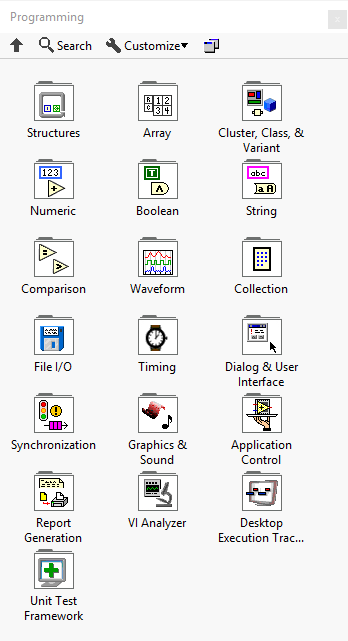
The Programming palette contains subpalettes for the basic programming elements in LabVIEW. Its subpalettes can be categorized into:
| Primitives | Structures |
|---|---|
| Data types | Array, Cluster, Class, and Variant, Numeric, Boolean and String |
| Operations | Comparison, Timing, Application Control and Synchronization |
| Data storage | Waveform, Collection and File I/O |
| User interaction | Dialog & User Interface, Graphics & Sound and Report Generation |
| Utilities | VI Analyzer, Desktop Execution Trace Toolkit and Unit Test Framework |
Subpalettes


Optional subpalettes
The following subpalettes are optionally installed by addons.


History
| Version | Change(s) |
|---|---|

|
The Collection subpalette was added. |

|
The Cluster & Variant subpalette was renamed to Cluster, Class, and Variant. |
|
|
This is the first version with the Programming palette. |