
Functions Palette/Programming: Difference between revisions
Make palette image controllable |
Add palette object information |
||
| Line 23: | Line 23: | ||
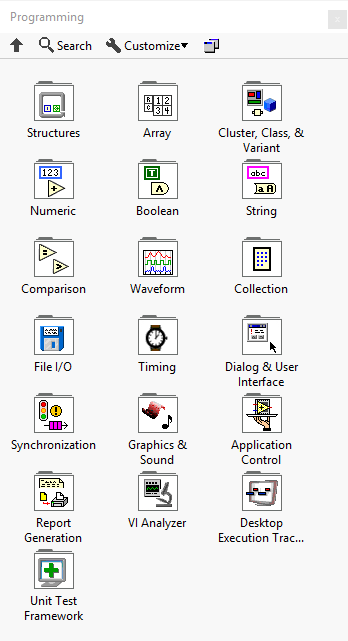
|53 = Functions Palette/Programming/Desktop Execution Trace Toolkit{{!}}Desktop Execution Trace Toolkit | |53 = Functions Palette/Programming/Desktop Execution Trace Toolkit{{!}}Desktop Execution Trace Toolkit | ||
|61 = Functions Palette/Programming/Unit Test Framework{{!}}Unit Test Framework | |61 = Functions Palette/Programming/Unit Test Framework{{!}}Unit Test Framework | ||
}} | |||
{{LabVIEW Palette Object Information | |||
|palette = Functions Palette | |||
|type = palette | |||
}} | }} | ||
Revision as of 16:20, 2 September 2019
 |
This article is a stub. You can help LabVIEW Wiki by expanding it. Please improve this article if you can. |
| Object information | |
|---|---|
| Owning palette(s) | Functions Palette |
| Type | Palette |
| Requires | Basic Development Environment |
Subpalettes


History
| Version | Change(s) |
|---|---|

|
The Collection subpalette was added. |

|
The Cluster & Variant subpalette was renamed to Cluster, Class, and Variant. |
|
|
This is the first version with the Programming palette. |