
Properties dialog: Difference between revisions
Started Page |
→Configuration Files: Updated table with some of the class links |
||
| (6 intermediate revisions by the same user not shown) | |||
| Line 1: | Line 1: | ||
{{TOCright}} | |||
The '''Properties dialog''' is accessed by right-clicking on any element on the [[Front Panel]] or [[Block Diagram]] and then selecting '''Properties'''. Depending on the type of the object different tabs are shown. Also, many tabs have two subpanels that contain different controls based on the data type. | The '''Properties dialog''' is accessed by right-clicking on any element on the [[Front Panel]] or [[Block Diagram]] and then selecting '''Properties'''. Depending on the type of the object different tabs are shown. Also, many tabs have two subpanels that contain different controls based on the data type. | ||
== Custom Property Pages == | |||
=== Configuration Files === | |||
The definition of which pages are shown is defined through a series of configuration text (.txt) files. These files are located at: <code>LabVIEW 20xx\resource\PropertyPages</code>. Each .txt file is named for the Class ID of the VI Server, (see [[VI Server Class Hierarchy]]. A list of config files is shown below: | |||
<div style="width: 100%; height: 300px; overflow: auto;"> | |||
{| class="wikitable" style="width: 100%;" | |||
! Class ID | |||
! VI Server Class | |||
! ConfigFile Name | |||
|- | |||
| 3 | |||
| [[Generic class]] | |||
| 3.txt | |||
|- | |||
| 4 | |||
| [[Decoration class]] | |||
| 4.txt | |||
|- | |||
| 5 | |||
| [[Text class]] | |||
| 5.txt | |||
|- | |||
| 6 | |||
| [[Control class]] | |||
| 6.txt | |||
|- | |||
| 7 | |||
| [[ColorBox class]] | |||
| 7.txt | |||
|- | |||
| 8 | |||
| [[Boolean class]] | |||
| 8.txt | |||
|- | |||
| 9 | |||
| [[RefNum class]] | |||
| 9.txt | |||
|- | |||
| 10 | |||
| [[LVVariant class]] (Variant) | |||
| 10.txt | |||
|- | |||
| 11 | |||
| [[Path class]] | |||
| 11.txt | |||
|- | |||
| 12 | |||
| [[ListBox class]] | |||
| 12.txt | |||
|- | |||
| 13 | |||
| [[Table class]] | |||
| 13.txt | |||
|- | |||
| 14 | |||
| Array | |||
| 14.txt | |||
|- | |||
| 15 | |||
| Picture | |||
| 15.txt | |||
|- | |||
| 16 | |||
| ActiveXContainer | |||
| 16.txt | |||
|- | |||
| 17 | |||
| Numeric | |||
| 17.txt | |||
|- | |||
| 18 | |||
| Digital | |||
| 18.txt | |||
|- | |||
| 19 | |||
| NamedNumeric | |||
| 19.txt | |||
|- | |||
| 20 | |||
| ColorRamp | |||
| 20.txt | |||
|- | |||
| 21 | |||
| Slide | |||
| 21.txt | |||
|- | |||
| 22 | |||
| GraphOrChart | |||
| 22.txt | |||
|- | |||
| 23 | |||
| WaveformChart | |||
| 23.txt | |||
|- | |||
| 24 | |||
| WaveformGraph | |||
| 24.txt | |||
|- | |||
| 25 | |||
| IntensityChart | |||
| 25.txt | |||
|- | |||
| 26 | |||
| IntensityGraph | |||
| 26.txt | |||
|- | |||
| 27 | |||
| String | |||
| 27.txt | |||
|- | |||
| 28 | |||
| IOName | |||
| 28.txt | |||
|- | |||
| 29 | |||
| ComboBox | |||
| 29.txt | |||
|- | |||
| 30 | |||
| Cluster | |||
| 30.txt | |||
|- | |||
| 31 | |||
| Panel | |||
| 31.txt | |||
|- | |||
| 32 | |||
| Knob | |||
| 32.txt | |||
|- | |||
| 33 | |||
| NumWithScale | |||
| 33.txt | |||
|- | |||
| 34 | |||
| Ring | |||
| 34.txt | |||
|- | |||
| 35 | |||
| Enum | |||
| 35.txt | |||
|- | |||
| 36 | |||
| GObject | |||
| 36.txt | |||
|- | |||
| 37 | |||
| Plot | |||
| 37.txt | |||
|- | |||
| 38 | |||
| Cursor | |||
| 38.txt | |||
|- | |||
| 39 | |||
| NumericText | |||
| 39.txt | |||
|- | |||
| 40 | |||
| Scale | |||
| 40.txt | |||
|- | |||
| 41 | |||
| ColorScale | |||
| 41.txt | |||
|- | |||
| 42 | |||
| GraphScale | |||
| 42.txt | |||
|- | |||
| 43 | |||
| ColorGraphScale | |||
| 43.txt | |||
|- | |||
| 44 | |||
| TypedRefNum | |||
| 44.txt | |||
|- | |||
| 45 | |||
| OldKnobScale | |||
| 45.txt | |||
|- | |||
| 46 | |||
| MCListbox | |||
| 46.txt | |||
|- | |||
| 47 | |||
| MeasureData | |||
| 47.txt | |||
|- | |||
| 48 | |||
| BVTag | |||
| 48.txt | |||
|- | |||
| 49 | |||
| DAQName | |||
| 49.txt | |||
|- | |||
| 50 | |||
| VISAName | |||
| 50.txt | |||
|- | |||
| 51 | |||
| IVIName | |||
| 51.txt | |||
|- | |||
| 52 | |||
| SlideScale | |||
| 52.txt | |||
|- | |||
| 54 | |||
| Page | |||
| 54.txt | |||
|- | |||
| 55 | |||
| TabControl | |||
| 55.txt | |||
|- | |||
| 56 | |||
| ConPane | |||
| 56.txt | |||
|- | |||
| 57 | |||
| DAQmx Global Channel | |||
| 57.txt | |||
|- | |||
| 58 | |||
| VI Refnum | |||
| 58.txt | |||
|- | |||
| 59 | |||
| App Refnum | |||
| 59.txt | |||
|- | |||
| 60 | |||
| Time Stamp | |||
| 60.txt | |||
|- | |||
| 61 | |||
| Digital Data | |||
| 61.txt | |||
|- | |||
| 65 | |||
| SubPanel | |||
| 65.txt | |||
|- | |||
| 66 | |||
| Tree | |||
| 66.txt | |||
|- | |||
| 67 | |||
| Shared Variable | |||
| 67.txt | |||
|- | |||
| 68 | |||
| [[GenClassRef class]] | |||
| 68.txt | |||
|- | |||
| 70 | |||
| Imaq Display | |||
| 70.txt | |||
|- | |||
| 72 | |||
| RadioButton | |||
| 72.txt | |||
|- | |||
| 75 | |||
| Pane | |||
| 75.txt | |||
|- | |||
| 76 | |||
| Splitterbar | |||
| 76.txt | |||
|- | |||
| 83 | |||
| XYGraph | |||
| 83.txt | |||
|- | |||
| 90 | |||
| Scrollbar | |||
| 90.txt | |||
|- | |||
| 92 | |||
| MixedSignalGraph | |||
| 92.txt | |||
|- | |||
| 100 | |||
| 3D Picture | |||
| 100.txt | |||
|- | |||
| 102 | |||
| LabVIEW Object | |||
| 102.txt | |||
|- | |||
| 121 | |||
| DigitalWaveformGraph | |||
| 121.txt | |||
|- | |||
| 122 | |||
| Imaq Image | |||
| 122.txt | |||
|- | |||
| 16387 | |||
| PathConstant | |||
| 16387.txt | |||
|- | |||
| 16388 | |||
| ArrayConstant | |||
| 16388.txt | |||
|- | |||
| 16390 | |||
| DigitalNumericConstant | |||
| 16390.txt | |||
|- | |||
| 16392 | |||
| StringConstant | |||
| 16392.txt | |||
|- | |||
| 16393 | |||
| ClusterConstant | |||
| 16393.txt | |||
|- | |||
| 16394 | |||
| FixedConstant (Inf, Pi, ...) | |||
| 16394.txt | |||
|- | |||
| 16400 | |||
| Function (sin, cos, …) | |||
| 16400.txt | |||
|- | |||
| 16407 | |||
| Sequence | |||
| 16407.txt | |||
|- | |||
| 16408 | |||
| CaseStructure | |||
| 16408.txt | |||
|- | |||
| 16422 | |||
| BooleanConstant | |||
| 16422.txt | |||
|- | |||
| 16423 | |||
| BlockDiagram | |||
| 16423.txt | |||
|- | |||
| 16424 | |||
| RingConstant | |||
| 16424.txt | |||
|- | |||
| 16425 | |||
| EnumConstant | |||
| 16425.txt | |||
|- | |||
| 16429 | |||
| Comparison (>, =, …) | |||
| 16429.txt | |||
|- | |||
| 16434 | |||
| ForLoop | |||
| 16434.txt | |||
|- | |||
| 16435 | |||
| WhileLoop | |||
| 16435.txt | |||
|- | |||
| 16458 | |||
| EventStructure | |||
| 16458.txt | |||
|- | |||
| 16459 | |||
| FlatSequence | |||
| 16459.txt | |||
|- | |||
| 16460 | |||
| Shared Variable Constant | |||
| 16460.txt | |||
|- | |||
| 16461 | |||
| AbsTimeConstant | |||
| 16461.txt | |||
|- | |||
| 16466 | |||
| ComboBoxConstant | |||
| 16466.txt | |||
|- | |||
| 16467 | |||
| TimedLoop | |||
| 16467.txt | |||
|- | |||
| 16487 | |||
| DisableStructure | |||
| 16487.txt | |||
|- | |||
| 16501 | |||
| LabVIEWClassConstant | |||
| 16501.txt | |||
|- | |||
| 16516 | |||
| InPlaceElementStructure | |||
| 16516.txt | |||
|- | |||
| 16522 | |||
| FeedbackNode | |||
| 16522.txt | |||
|} | |||
</div> | |||
=== Property Tabs === | |||
There 33 pre-defined ''' Property Tabs''' or pages to the tab control. Multiple VIs can be displayed on the same page, arranged vertically. | |||
. | |||
<div style="width: auto; height: 300px; overflow: auto;"> | |||
{| class="wikitable | {| class="wikitable | ||
|+ Possible Property Dialog Pages | |+ Possible Property Dialog Pages | ||
| Line 6: | Line 419: | ||
! ID | ! ID | ||
! Page Title | ! Page Title | ||
! Possible Objects | ! Possible Pages and Objects | ||
|- | |- | ||
| 0 | | 0 | ||
| Appearance | | Appearance | ||
| | | | ||
* '''PropPage_Appearance.vi''': All Classes with Other Appearance VIs (This appears in the Top Subpanel, the specific in the Bottom Subpanel) | |||
* '''PropPage_ColorBoxAppearance.vi''': [[ColorBox class|ColorBox Control (7)]] | * '''PropPage_ColorBoxAppearance.vi''': [[ColorBox class|ColorBox Control (7)]] | ||
* '''PropPage_BooleanAppearance.vi''': [[Boolean class|Boolean Control (8)]] | * '''PropPage_BooleanAppearance.vi''': [[Boolean class|Boolean Control (8)]] | ||
* '''PropPage_PathAppearance.vi''': [[Path class|Path Control (11)]] | * '''PropPage_PathAppearance.vi''': [[Path class|Path Control (11)]] | ||
* '''PropPage_TabularAppearance.vi''': [[ListBox class|ListBox Control (12)]] | * '''PropPage_TabularAppearance.vi''': [[ListBox class|ListBox Control (12)]], [[Table class|Table Control (13)]] | ||
* '''PropPage_ArrayAppearance.vi''': [[Array class|Array Control (14)]] | |||
* '''PropPage_NumericAppearance.vi''': [[Digital class|Digital Control (18)]] | |||
* '''PropPage_SliderAppearance.vi''': [[Slide class|Slide Control (21)]] | |||
* '''PropPage_GraphAppearance.vi''': [[WaveformChart class|WaveformChart Control (23)]], [[WaveformGraph class|WaveformGraph Control (24)]] | |||
|- | |- | ||
| 1 | | 1 | ||
| Data Type | | Data Type | ||
| | | | ||
* '''PropPage_DataType.vi''': [[Digital class|Digital Control (18)]], [[Slide class|Slide Control (21)]] | |||
* '''PropPage_NumericDataType.vi''': [[ColorRamp class|ColorRamp Control (20)]] | |||
|- | |- | ||
| 2 | | 2 | ||
| Data Entry | | Data Entry | ||
| | | | ||
* '''PropPage_DataRange.vi''': [[Digital class|Digital Control (18)]], [[ColorRamp class|ColorRamp Control (20)]], [[Slide class|Slide Control (21)]] | |||
|- | |- | ||
| 3 | | 3 | ||
| Scale | | Scale | ||
| | | | ||
* '''PropPage_Scale.vi''': [[Slide class|Slide Control (21)]] | |||
|- | |- | ||
| 4 | | 4 | ||
| Display Format | | Display Format | ||
| | | | ||
* '''PropPage_FormatAndPrecision.vi''': [[Digital class|Digital Control (18)]], [[ColorRamp class|ColorRamp Control (20)]], [[Slide class|Slide Control (21)]], [[WaveformChart class|WaveformChart Control (23)]], [[WaveformGraph class|WaveformGraph Control (24)]] | |||
|- | |- | ||
| 5 | | 5 | ||
| Line 39: | Line 462: | ||
| Plots | | Plots | ||
| | | | ||
* '''PropPage_Plots.vi''': [[WaveformChart class|WaveformChart Control (23)]], [[WaveformGraph class|WaveformGraph Control (24)]] | |||
|- | |- | ||
| 7 | | 7 | ||
| Scales | | Scales | ||
| | | | ||
* '''PropPage_Scales.vi''': [[WaveformChart class|WaveformChart Control (23)]], [[WaveformGraph class|WaveformGraph Control (24)]] | |||
|- | |- | ||
| 8 | | 8 | ||
| Cursors | | Cursors | ||
| | | | ||
* '''PropPage_Cursors.vi''': [[WaveformGraph class|WaveformGraph Control (24)]] | |||
|- | |- | ||
| 9 | | 9 | ||
| Operation | | Operation | ||
| '''PropPage_BooleanAct.vi''': [[Boolean class|Boolean Control (8)]] | | | ||
* '''PropPage_BooleanAct.vi''': [[Boolean class|Boolean Control (8)]] | |||
|- | |- | ||
| 10 | | 10 | ||
| Line 59: | Line 486: | ||
| Text Labels | | Text Labels | ||
| | | | ||
* '''PropPage_RingEditor.vi''': [[Slide class|Slide Control (21)]] | |||
|- | |- | ||
| 12 | | 12 | ||
| Browse Options | | Browse Options | ||
| '''PropPage_BrowseOption.vi''': [[Path class|Path Control (11)]] | | | ||
* '''PropPage_BrowseOption.vi''': [[Path class|Path Control (11)]] | |||
|- | |- | ||
| 13 | | 13 | ||
| Size | | Size | ||
| | | | ||
* '''PropPage_ArraySize.vi''': [[Array class|Array Control (14)]] | |||
|- | |- | ||
| 14 | | 14 | ||
| Documentation | | Documentation | ||
| '''PropPage_Documentation.vi''': [[Control class|Control (6)]], [[ColorBox class|ColorBox Control (7)]], [[Boolean class|Boolean Control (8)]], [[RefNum class|RefNum Control (9)]], [[LVVariant class|LVVariant Control (10)]], [[Path class|Path Control (11)]], [[ListBox class|ListBox Control (12)]] | | | ||
* '''PropPage_Documentation.vi''': [[Control class|Control (6)]], [[ColorBox class|ColorBox Control (7)]], [[Boolean class|Boolean Control (8)]], [[RefNum class|RefNum Control (9)]], [[LVVariant class|LVVariant Control (10)]], [[Path class|Path Control (11)]], [[ListBox class|ListBox Control (12)]], [[Table class|Table Control (13)]], [[Array class|Array Control (14)]], [[Picture class|Picture Control(15)]], [[ActiveXContainer class|ActiveXContainer Control (16)]], [[Digital class|Digital Control (18)]], [[ColorRamp class|ColorRamp Control (20)]], [[Slide class|Slide Control (21)]], [[WaveformChart class|WaveformChart Control (23)]], [[WaveformGraph class|WaveformGraph Control (24)]] | |||
|- | |- | ||
| 15 | | 15 | ||
| Data Binding | | Data Binding | ||
| '''PropPage_FPB.vi''': [[Control class|Control (6)]], [[ColorBox class|ColorBox Control (7)]], [[Boolean class|Boolean Control (8)]], [[LVVariant class|LVVariant Control (10)]], [[Path class|Path Control (11)]], [[ListBox class|ListBox Control (12)]] | | | ||
* '''PropPage_FPB.vi''': [[Control class|Control (6)]], [[ColorBox class|ColorBox Control (7)]], [[Boolean class|Boolean Control (8)]], [[LVVariant class|LVVariant Control (10)]], [[Path class|Path Control (11)]], [[ListBox class|ListBox Control (12)]], [[Table class|Table Control (13)]], [[Array class|Array Control (14)]], [[Digital class|Digital Control (18)]], [[ColorRamp class|ColorRamp Control (20)]], [[Slide class|Slide Control (21)]], [[WaveformChart class|WaveformChart Control (23)]], [[WaveformGraph class|WaveformGraph Control (24)]] | |||
|- | |- | ||
| 16 | | 16 | ||
| Key Navigation | | Key Navigation | ||
| '''PropPage_KeyNav.vi''': [[Control class|Control (6)]], [[ColorBox class|ColorBox Control (7)]], [[Boolean class|Boolean Control (8)]], [[RefNum class|RefNum Control (9)]], [[LVVariant class|LVVariant Control (10)]], [[Path class|Path Control (11)]], [[ListBox class|ListBox Control (12)]] | | | ||
* '''PropPage_KeyNav.vi''': [[Control class|Control (6)]], [[ColorBox class|ColorBox Control (7)]], [[Boolean class|Boolean Control (8)]], [[RefNum class|RefNum Control (9)]], [[LVVariant class|LVVariant Control (10)]], [[Path class|Path Control (11)]], [[ListBox class|ListBox Control (12)]], [[Table class|Table Control (13)]], [[Array class|Array Control (14)]], [[Picture class|Picture Control(15)]], [[Digital class|Digital Control (18)]], [[ColorRamp class|ColorRamp Control (20)]], [[Slide class|Slide Control (21)]], [[WaveformChart class|WaveformChart Control (23)]], [[WaveformGraph class|WaveformGraph Control (24)]] | |||
|- | |- | ||
| 17 | | 17 | ||
| Security | | Security | ||
| '''PropPage_FPSecurity.vi''': [[Control class|Control (6)]], [[ColorBox class|ColorBox (7)]], [[Boolean class|Boolean (8)]], [[RefNum class|RefNum Control (9)]], [[LVVariant class|LVVariant Control (10)]], [[Path class|Path Control (11)]], [[ListBox class|ListBox Control (12)]] | | | ||
* '''PropPage_FPSecurity.vi''': [[Control class|Control (6)]], [[ColorBox class|ColorBox (7)]], [[Boolean class|Boolean (8)]], [[RefNum class|RefNum Control (9)]], [[LVVariant class|LVVariant Control (10)]], [[Path class|Path Control (11)]], [[ListBox class|ListBox Control (12)]], [[Table class|Table Control (13)]], [[Array class|Array Control (14)]], [[Digital class|Digital Control (18)]], [[ColorRamp class|ColorRamp Control (20)]], [[Slide class|Slide Control (21)]], [[WaveformChart class|WaveformChart Control (23)]], [[WaveformGraph class|WaveformGraph Control (24)]] | |||
|- | |- | ||
| 18 | | 18 | ||
| Line 137: | Line 571: | ||
|- | |- | ||
| 31 | | 31 | ||
| FPGA Implementation | |||
| | |||
|- | |||
| 32 | |||
| Background | | Background | ||
| | | | ||
|} | |} | ||
</div> | |||
=== Adding a "New" Tab === | |||
Due to the tabs (pages) being predefined, new pages cannot be added. However, a tab that is shown can be overridden or a tab that wouldn't normally be shown can be overridden and made to be shown. | |||
To do this follow these steps: | |||
# Create your VI and save it at: <code>[LabVIEW 20xx]\resource\PropertyPages\Pages\PropPage_[your unique name].vi</code> | |||
# Create your VI and save it at: [LabVIEW 20xx]\resource\PropertyPages\Pages\PropPage_[your unique name].vi | |||
## Ensure the VI has the standard 4x2x2x4 connector pane. | ## Ensure the VI has the standard 4x2x2x4 connector pane. | ||
## Create a boolean indicator called '''OKtoQuit''' and connect it to [2] (or the second one down on the right, a.k.a. outputs). | ## Create a boolean indicator called '''OKtoQuit''' and connect it to [2] (or the second one down on the right, a.k.a. outputs). | ||
## Create a string control called '''QueueName'''. It is not connected to the connector pane but is used for a [[Named Queue]] | ## Create a string control called '''QueueName'''. It is not connected to the connector pane but is used for a [[Named Queue]]. This Queue is required to stop the VI. | ||
## Create an array of Generic Refnum controls called '''Main Ref Array In'''. It also is not connected to the connector pane and is the array of references to the selected objects. Only tabs that are defined for all of the selected objects are shown. | ## Create an array of Generic Refnum controls called '''Main Ref Array In'''. It also is not connected to the connector pane and is the array of references to the selected objects. Only tabs that are defined for all of the selected objects are shown. Use these references to access/change any of the properties of the desired GObject type. | ||
# | ## If you want to be able to change the Page's caption add the control from <code>[LabVIEW 20xx]\vi.lib\PropPageSupport\pp_TabRef.ctl</code> and the following code: | ||
## In the File, a line | #: [[File:RenamingAPropertyPage.png|frame|center|Changing a Tab's Caption]] | ||
#:: Where '''index''' = the page number (see below), and '''Tab Caption''' = the new caption to set to. | |||
# Goto <code>[LabVIEW 20xx]\resource\PropertyPages</code> and find the text file or files for the [[VI Server Class Hierarchy|VI Server Classes]] you want your page to show up for. The files are named for the VI Server Class ID (for example 6 = Control, 27 = String, etc.). | |||
## Create a file with the desired name <code>[Class ID].txt</code> if it doesn't already exist. | |||
## In the File, add a line for each page that will appear for that class in the form of <code>[A number],[the Page VI name]</code> where the number is the index of the page (0-32) and the VI is the VI to appear in that page's subpanel. | |||
[[Category:Properties]] | [[Category:Properties]] | ||
Latest revision as of 06:10, 23 March 2024
The Properties dialog is accessed by right-clicking on any element on the Front Panel or Block Diagram and then selecting Properties. Depending on the type of the object different tabs are shown. Also, many tabs have two subpanels that contain different controls based on the data type.
Custom Property Pages
Configuration Files
The definition of which pages are shown is defined through a series of configuration text (.txt) files. These files are located at: LabVIEW 20xx\resource\PropertyPages. Each .txt file is named for the Class ID of the VI Server, (see VI Server Class Hierarchy. A list of config files is shown below:
| Class ID | VI Server Class | ConfigFile Name |
|---|---|---|
| 3 | Generic class | 3.txt |
| 4 | Decoration class | 4.txt |
| 5 | Text class | 5.txt |
| 6 | Control class | 6.txt |
| 7 | ColorBox class | 7.txt |
| 8 | Boolean class | 8.txt |
| 9 | RefNum class | 9.txt |
| 10 | LVVariant class (Variant) | 10.txt |
| 11 | Path class | 11.txt |
| 12 | ListBox class | 12.txt |
| 13 | Table class | 13.txt |
| 14 | Array | 14.txt |
| 15 | Picture | 15.txt |
| 16 | ActiveXContainer | 16.txt |
| 17 | Numeric | 17.txt |
| 18 | Digital | 18.txt |
| 19 | NamedNumeric | 19.txt |
| 20 | ColorRamp | 20.txt |
| 21 | Slide | 21.txt |
| 22 | GraphOrChart | 22.txt |
| 23 | WaveformChart | 23.txt |
| 24 | WaveformGraph | 24.txt |
| 25 | IntensityChart | 25.txt |
| 26 | IntensityGraph | 26.txt |
| 27 | String | 27.txt |
| 28 | IOName | 28.txt |
| 29 | ComboBox | 29.txt |
| 30 | Cluster | 30.txt |
| 31 | Panel | 31.txt |
| 32 | Knob | 32.txt |
| 33 | NumWithScale | 33.txt |
| 34 | Ring | 34.txt |
| 35 | Enum | 35.txt |
| 36 | GObject | 36.txt |
| 37 | Plot | 37.txt |
| 38 | Cursor | 38.txt |
| 39 | NumericText | 39.txt |
| 40 | Scale | 40.txt |
| 41 | ColorScale | 41.txt |
| 42 | GraphScale | 42.txt |
| 43 | ColorGraphScale | 43.txt |
| 44 | TypedRefNum | 44.txt |
| 45 | OldKnobScale | 45.txt |
| 46 | MCListbox | 46.txt |
| 47 | MeasureData | 47.txt |
| 48 | BVTag | 48.txt |
| 49 | DAQName | 49.txt |
| 50 | VISAName | 50.txt |
| 51 | IVIName | 51.txt |
| 52 | SlideScale | 52.txt |
| 54 | Page | 54.txt |
| 55 | TabControl | 55.txt |
| 56 | ConPane | 56.txt |
| 57 | DAQmx Global Channel | 57.txt |
| 58 | VI Refnum | 58.txt |
| 59 | App Refnum | 59.txt |
| 60 | Time Stamp | 60.txt |
| 61 | Digital Data | 61.txt |
| 65 | SubPanel | 65.txt |
| 66 | Tree | 66.txt |
| 67 | Shared Variable | 67.txt |
| 68 | GenClassRef class | 68.txt |
| 70 | Imaq Display | 70.txt |
| 72 | RadioButton | 72.txt |
| 75 | Pane | 75.txt |
| 76 | Splitterbar | 76.txt |
| 83 | XYGraph | 83.txt |
| 90 | Scrollbar | 90.txt |
| 92 | MixedSignalGraph | 92.txt |
| 100 | 3D Picture | 100.txt |
| 102 | LabVIEW Object | 102.txt |
| 121 | DigitalWaveformGraph | 121.txt |
| 122 | Imaq Image | 122.txt |
| 16387 | PathConstant | 16387.txt |
| 16388 | ArrayConstant | 16388.txt |
| 16390 | DigitalNumericConstant | 16390.txt |
| 16392 | StringConstant | 16392.txt |
| 16393 | ClusterConstant | 16393.txt |
| 16394 | FixedConstant (Inf, Pi, ...) | 16394.txt |
| 16400 | Function (sin, cos, …) | 16400.txt |
| 16407 | Sequence | 16407.txt |
| 16408 | CaseStructure | 16408.txt |
| 16422 | BooleanConstant | 16422.txt |
| 16423 | BlockDiagram | 16423.txt |
| 16424 | RingConstant | 16424.txt |
| 16425 | EnumConstant | 16425.txt |
| 16429 | Comparison (>, =, …) | 16429.txt |
| 16434 | ForLoop | 16434.txt |
| 16435 | WhileLoop | 16435.txt |
| 16458 | EventStructure | 16458.txt |
| 16459 | FlatSequence | 16459.txt |
| 16460 | Shared Variable Constant | 16460.txt |
| 16461 | AbsTimeConstant | 16461.txt |
| 16466 | ComboBoxConstant | 16466.txt |
| 16467 | TimedLoop | 16467.txt |
| 16487 | DisableStructure | 16487.txt |
| 16501 | LabVIEWClassConstant | 16501.txt |
| 16516 | InPlaceElementStructure | 16516.txt |
| 16522 | FeedbackNode | 16522.txt |
Property Tabs
There 33 pre-defined Property Tabs or pages to the tab control. Multiple VIs can be displayed on the same page, arranged vertically. .
Adding a "New" Tab
Due to the tabs (pages) being predefined, new pages cannot be added. However, a tab that is shown can be overridden or a tab that wouldn't normally be shown can be overridden and made to be shown.
To do this follow these steps:
- Create your VI and save it at:
[LabVIEW 20xx]\resource\PropertyPages\Pages\PropPage_[your unique name].vi- Ensure the VI has the standard 4x2x2x4 connector pane.
- Create a boolean indicator called OKtoQuit and connect it to [2] (or the second one down on the right, a.k.a. outputs).
- Create a string control called QueueName. It is not connected to the connector pane but is used for a Named Queue. This Queue is required to stop the VI.
- Create an array of Generic Refnum controls called Main Ref Array In. It also is not connected to the connector pane and is the array of references to the selected objects. Only tabs that are defined for all of the selected objects are shown. Use these references to access/change any of the properties of the desired GObject type.
- If you want to be able to change the Page's caption add the control from
[LabVIEW 20xx]\vi.lib\PropPageSupport\pp_TabRef.ctland the following code:
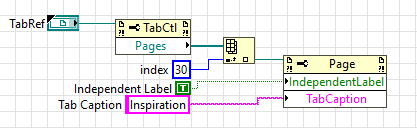
Changing a Tab's Caption - Where index = the page number (see below), and Tab Caption = the new caption to set to.
- Goto
[LabVIEW 20xx]\resource\PropertyPagesand find the text file or files for the VI Server Classes you want your page to show up for. The files are named for the VI Server Class ID (for example 6 = Control, 27 = String, etc.).- Create a file with the desired name
[Class ID].txtif it doesn't already exist. - In the File, add a line for each page that will appear for that class in the form of
[A number],[the Page VI name]where the number is the index of the page (0-32) and the VI is the VI to appear in that page's subpanel.
- Create a file with the desired name
