
Functions Palette/Programming/File I/O/Storage/DataPlugin: Difference between revisions
mNo edit summary |
mNo edit summary |
||
| Line 11: | Line 11: | ||
|21 = Data File Viewer function{{!}}Data File Viewer | |21 = Data File Viewer function{{!}}Data File Viewer | ||
|22 = Convert to TDM or TDMS function{{!}}Convert to TDM or TDMS | |22 = Convert to TDM or TDMS function{{!}}Convert to TDM or TDMS | ||
|23 = Manage DataPlugins | |23 = Functions Palette/Programming/File I/O/Storage/DataPlugin/Manage DataPlugins{{!}}Manage DataPlugins | ||
|24 = Advanced Storage | |24 = Functions Palette/Programming/File I/O/Storage/DataPlugin/Advanced Storage{{!}}Advanced Storage | ||
}} | }} | ||
| Line 26: | Line 26: | ||
! Name | ! Name | ||
|- | |- | ||
! style="text-align: center;" | [[File:Storage-DataPlugin Palette - Manage DataPlugins.png|frameless|border|Manage DataPlugins|link=Manage DataPlugins | ! style="text-align: center;" | [[File:Storage-DataPlugin Palette - Manage DataPlugins.png|frameless|border|Manage DataPlugins|link=Functions Palette/Programming/File I/O/Storage/DataPlugin/Manage DataPlugins]] | ||
| [[Manage DataPlugins | | [[Functions Palette/Programming/File I/O/Storage/DataPlugin/Manage DataPlugins|Manage DataPlugins]] | ||
|- | |- | ||
! style="text-align: center;" | [[File:Storage-DataPlugin Palette - Advanced Storage.png|frameless|border|Advanced Storage|link=Advanced Storage | ! style="text-align: center;" | [[File:Storage-DataPlugin Palette - Advanced Storage.png|frameless|border|Advanced Storage|link=Functions Palette/Programming/File I/O/Storage/DataPlugin/Advanced Storage]] | ||
| [[Advanced Storage | | [[Functions Palette/Programming/File I/O/Storage/DataPlugin/Advanced Storage|Advanced Storage]] | ||
|} | |} | ||
Revision as of 14:13, 22 June 2020
| Object information | |
|---|---|
| Owning palette(s) | File I/O palette |
| Type | Palette |
| Requires | Basic Development Environment |
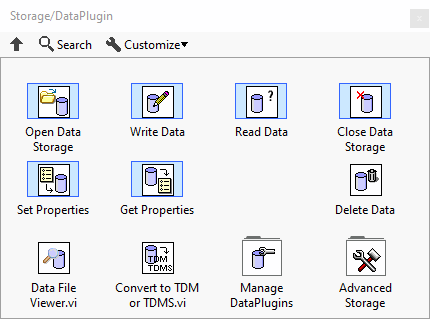
Use the Storage/DataPlugin VIs to read measurement data from a variety of file formats, write data to .tdm or .tdms files, or manage DataPlugins installed on the local computer. You must download appropriate DataPlugins and register them on the local computer before you can access the corresponding file formats. Refer to the National Instruments website at www.ni.com/downloads/dataplugins/ to download DataPlugins.
Note: If you build an installer for a stand-alone application or shared library that uses the Storage/DataPlugin VIs, you must include the NI USI installer. To include the NI USI installer, on the Additional Installers page of the Installer Properties dialog box, remove the checkmark from the Automatically select recommended installers checkbox and place a checkmark in the NI USI checkbox.
Subpalette
| Icon | Name |
|---|---|

|
Manage DataPlugins |

|
Advanced Storage |
Functions
| Icon | Name |
|---|---|

|
Open Data Storage |

|
Write Data |

|
Read Data |

|
Close Data Storage |

|
Set Properties |

|
Get Properties |

|
Delete Data |

|
Data File Viewer |

|
Convert to TDM or TDMS |
History
 |
History information is needed. What changes have occurred over previous versions? |
| Version | Change(s) |
|---|---|

|
More info to come. |