
Functions Palette/Programming/Cluster, Class, and Variant: Difference between revisions
→Functions: Split constants into own list. |
mNo edit summary |
||
| Line 29: | Line 29: | ||
== Subpalettes == | == Subpalettes == | ||
{| class="wikitable" | {| class="wikitable sortable" | ||
! Icon | |||
! Name | |||
|- | |||
| [[File:Cluster, Class, & Variant Palette - Variant.png]] | | [[File:Cluster, Class, & Variant Palette - Variant.png]] | ||
| [[Functions Palette/Programming/Cluster, Class, & Variant/Variant|Variant]] | | [[Functions Palette/Programming/Cluster, Class, & Variant/Variant|Variant]] | ||
Revision as of 11:50, 24 June 2020
| Object information | |
|---|---|
| Owning palette(s) | Programming palette |
| Type | Palette |
| Requires | Basic Development Environment |
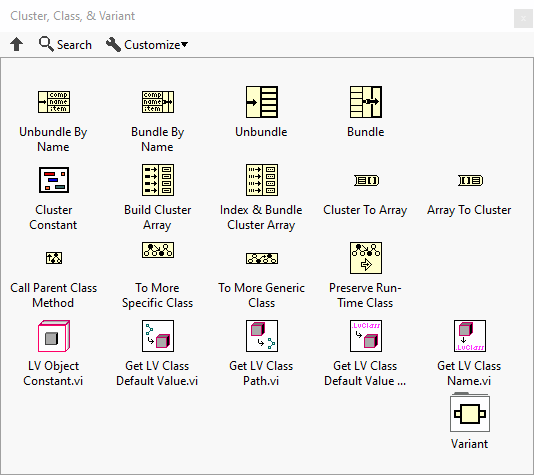
Use the Cluster, Class & Variant VIs and functions to create and manipulate clusters and LabVIEW classes, convert LabVIEW data to a format you can manipulate independent of data type, add attributes to the data, and convert variant data to LabVIEW data.
Subpalettes
| Icon | Name |
|---|---|

|
Variant |
Functions


Constants
| Icon | Name |
|---|---|

|
Cluster Constant |

|
LV Object Constant |
History
 |
History information is needed. What changes have occurred over previous versions? |
| Version | Change(s) |
|---|---|

|
More info to come. |