|
|
| Line 27: |
Line 27: |
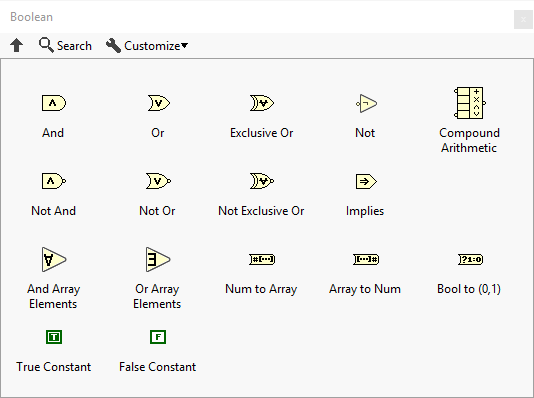
| The Boolean palette provides constants and functions that can be performed on [[Boolean]], [[Numeric]] and [[Fixed-point]] values. | | The Boolean palette provides constants and functions that can be performed on [[Boolean]], [[Numeric]] and [[Fixed-point]] values. |
|
| |
|
| == [[File:Andfunct.png|Logical And]] Logical And == | | == Functions == |
| | |
| Accepts two Boolean or [[Numeric|numeric]] inputs.
| |
| | |
| '''Boolean''': If provided Boolean values, returns [[File:BooleanTrue2010.png|border|True]] if both inputs are [[File:BooleanTrue2010.png|border|True]], otherwise returns [[File:BooleanFalse2010.png|border|False]].
| |
| | |
| {| class="wikitable"
| |
| ! x
| |
| ! y
| |
| ! output
| |
| |-
| |
| | [[File:BooleanFalse2010.png|border|False]]
| |
| | [[File:BooleanFalse2010.png|border|False]]
| |
| | [[File:BooleanFalse2010.png|border|False]]
| |
| |-
| |
| | [[File:BooleanFalse2010.png|border|False]]
| |
| | [[File:BooleanTrue2010.png|border|True]]
| |
| | [[File:BooleanFalse2010.png|border|False]]
| |
| |-
| |
| | [[File:BooleanTrue2010.png|border|True]]
| |
| | [[File:BooleanFalse2010.png|border|False]]
| |
| | [[File:BooleanFalse2010.png|border|False]]
| |
| |-
| |
| | [[File:BooleanTrue2010.png|border|True]]
| |
| | [[File:BooleanTrue2010.png|border|True]]
| |
| | [[File:BooleanTrue2010.png|border|True]]
| |
| |}
| |
| | |
| '''Numeric''': If provided [[Numeric|numeric]] values, performs a bit-wise AND operation.
| |
| | |
| {| class="wikitable"
| |
| !
| |
| ! Binary
| |
| ! Decimal
| |
| |-
| |
| ! x
| |
| | <code>10101010</code>
| |
| | style="text-align: center;" | 170
| |
| |-
| |
| ! y
| |
| | <code>11110000</code>
| |
| | style="text-align: center;" | 240
| |
| |-
| |
| ! output
| |
| | <code>10100000</code>
| |
| | style="text-align: center;" | 160
| |
| |}
| |
| | |
| == [[File:Orfunct.png|Logical Or]] Logical Or ==
| |
| | |
| Accepts two Boolean or [[Numeric|numeric]] inputs.
| |
| | |
| '''Boolean''': If provided Boolean values, returns [[File:BooleanTrue2010.png|border|True]] if any input is [[File:BooleanTrue2010.png|border|True]], otherwise returns [[File:BooleanFalse2010.png|border|False]].
| |
| | |
| {| class="wikitable"
| |
| ! x
| |
| ! y
| |
| ! output
| |
| |-
| |
| | [[File:BooleanFalse2010.png|border|False]]
| |
| | [[File:BooleanFalse2010.png|border|False]]
| |
| | [[File:BooleanFalse2010.png|border|False]]
| |
| |-
| |
| | [[File:BooleanFalse2010.png|border|False]]
| |
| | [[File:BooleanTrue2010.png|border|True]]
| |
| | [[File:BooleanTrue2010.png|border|True]]
| |
| |-
| |
| | [[File:BooleanTrue2010.png|border|True]]
| |
| | [[File:BooleanFalse2010.png|border|False]]
| |
| | [[File:BooleanTrue2010.png|border|True]]
| |
| |-
| |
| | [[File:BooleanTrue2010.png|border|True]]
| |
| | [[File:BooleanTrue2010.png|border|True]]
| |
| | [[File:BooleanTrue2010.png|border|True]]
| |
| |}
| |
| | |
| '''Numeric''': If provided [[Numeric|numeric]] values, performs a bit-wise OR operation.
| |
| | |
| {| class="wikitable"
| |
| !
| |
| ! Binary
| |
| ! Decimal
| |
| |-
| |
| ! x
| |
| | <code>10101010</code>
| |
| | style="text-align: center;" | 170
| |
| |-
| |
| ! y
| |
| | <code>11110000</code>
| |
| | style="text-align: center;" | 240
| |
| |-
| |
| ! output
| |
| | <code>11111010</code>
| |
| | style="text-align: center;" | 250
| |
| |}
| |
| | |
| == [[File:Xclusvor.png|Exclusive Or]] Exclusive Or ==
| |
| | |
| Accepts two Boolean or [[Numeric|numeric]] inputs.
| |
| | |
| '''Boolean''': If provided Boolean values, returns [[File:BooleanTrue2010.png|border|True]] if any input is [[File:BooleanTrue2010.png|border|True]] exclusively, otherwise returns [[File:BooleanFalse2010.png|border|False]].
| |
|
| |
|
| {| class="wikitable" | | {| class="wikitable" |
| ! x
| | | [[File:Andfunct.png|Logical And]] |
| ! y
| | | [[And function|Logical And]] |
| ! output
| |
| |- | | |- |
| | [[File:BooleanFalse2010.png|border|False]] | | | [[File:Orfunct.png|Logical Or]] |
| | [[File:BooleanFalse2010.png|border|False]]
| | | [[Or function|Logical Or]] |
| | [[File:BooleanFalse2010.png|border|False]] | |
| |- | | |- |
| | [[File:BooleanFalse2010.png|border|False]] | | | [[File:Xclusvor.png|Exclusive Or]] |
| | [[File:BooleanTrue2010.png|border|True]]
| | | [[Exclusive Or function|Exclusive Or]] |
| | [[File:BooleanTrue2010.png|border|True]] | |
| |- | | |- |
| | [[File:BooleanTrue2010.png|border|True]] | | | [[File:Notfunct.png|Not]] |
| | [[File:BooleanFalse2010.png|border|False]]
| | | [[Not function|Not]] |
| | [[File:BooleanTrue2010.png|border|True]] | |
| |- | | |- |
| | [[File:BooleanTrue2010.png|border|True]] | | | [[File:Comparit.png|Compound Arithmetic]] |
| | [[File:BooleanTrue2010.png|border|True]]
| | | [[Compound Arithmetic function|Compound Arithmetic]] |
| | [[File:BooleanFalse2010.png|border|False]]
| |
| |} | |
| | |
| '''Numeric''': If provided [[Numeric|numeric]] values, performs a bit-wise XOR operation.
| |
| | |
| {| class="wikitable"
| |
| !
| |
| ! Binary
| |
| ! Decimal
| |
| |- | | |- |
| ! x
| | | [[File:Notandfn.png|Not And]] |
| | <code>10101010</code> | | | [[Not And function|Not And]] |
| | style="text-align: center;" | 170 | |
| |- | | |- |
| ! y
| | | [[File:Notorfun.png|Not Or]] |
| | <code>11110000</code> | | | [[Not Or function|Not Or]] |
| | style="text-align: center;" | 240 | |
| |- | | |- |
| ! output
| | | [[File:Notxclor.png|Not Exclusive Or]] |
| | <code>01011010</code>
| | | [[Not Exclusive Or function|Not Exclusive Or]] |
| | style="text-align: center;" | 90
| |
| |} | |
| | |
| == [[File:Notfunct.png|Not]] Not ==
| |
| | |
| Returns the inverted value of an Boolean or [[Numeric|numeric]] input.
| |
| | |
| '''Boolean''':
| |
| | |
| {| class="wikitable"
| |
| ! x
| |
| ! output
| |
| |- | | |- |
| | [[File:BooleanFalse2010.png|border|False]] | | | [[File:Implies.png|Implies]] |
| | [[File:BooleanTrue2010.png|border|True]] | | | [[Implies function|Implies]] |
| |- | | |- |
| | [[File:BooleanTrue2010.png|border|True]] | | | [[File:Andarray.png|And Array Elements]] |
| | [[File:BooleanFalse2010.png|border|False]] | | | [[And Array Elements function|And Array Elements]] |
| |}
| |
| | |
| '''Numeric:'''
| |
| | |
| {| class="wikitable"
| |
| !
| |
| ! Binary
| |
| ! Decimal
| |
| |- | | |- |
| ! x
| | | [[File:Orarray.png|Or Array Elements]] |
| | <code>10101010</code> | | | [[Or Array Elements function|Or Array Elements]] |
| | style="text-align: center;" | 170 | |
| |- | | |- |
| ! output
| | | [[File:Numtoboo.png|Num to Array]] |
| | <code>01010101</code>
| | | [[Num to Array function|Num to Array]] |
| | style="text-align: center;" | -171
| |
| |}
| |
| | |
| == [[File:Comparit.png|Compound Arithmetic]] Compound Arithmetic ==
| |
| | |
| [[File:CompoundArithmeticChangeMode.png|thumb|Change mode on the Compound Arithmetic function]]
| |
| | |
| Performs various logical and arithmetic operations on Boolean and numeric values for a dynamic amount of inputs.
| |
| | |
| '''Available operations''':
| |
| | |
| * Add
| |
| * Multiply
| |
| * AND (see [[#Logical_And|Logical And]])
| |
| * OR (see [[#Logical_Or|Logical Or]])
| |
| * XOR (see [[#Exclusive_Or|Exclusive Or]])
| |
| | |
| This function is especially useful when doing logical and arithmetic operations on more than two input values.
| |
| | |
| '''Invert input and output''':
| |
| | |
| The Compound Arithmetic function allows to invert any of the inputs as well as the output selectively.
| |
| | |
| [[File:CompoundArithmeticInvertInput.png|frameless|border|Invert input on the Compound Arithmetic function]]
| |
| | |
| <br clear="all">
| |
| == [[File:Notandfn.png|Not And]] Not And ==
| |
| | |
| This is the same as [[#Logical_And|Logical And]] but the output is inverted.
| |
| | |
| '''Boolean''':
| |
| | |
| {| class="wikitable"
| |
| ! x
| |
| ! y
| |
| ! output
| |
| |-
| |
| | [[File:BooleanFalse2010.png|border|False]]
| |
| | [[File:BooleanFalse2010.png|border|False]]
| |
| | [[File:BooleanTrue2010.png|border|True]]
| |
| |-
| |
| | [[File:BooleanFalse2010.png|border|False]]
| |
| | [[File:BooleanTrue2010.png|border|True]]
| |
| | [[File:BooleanTrue2010.png|border|True]]
| |
| |- | | |- |
| | [[File:BooleanTrue2010.png|border|True]] | | | [[File:Bootonum.png|Array to Num]] |
| | [[File:BooleanFalse2010.png|border|False]]
| | | [[Array to Num function|Array to Num]] |
| | [[File:BooleanTrue2010.png|border|True]] | |
| |- | | |- |
| | [[File:BooleanTrue2010.png|border|True]] | | | [[File:Bootoone.png|Bool to (0,1)]] |
| | [[File:BooleanTrue2010.png|border|True]]
| | | [[Bool to (0,1) function|Bool to (0,1)]] |
| | [[File:BooleanFalse2010.png|border|False]] | |
| |} | | |} |
|
| |
|
| '''Numeric'''
| | == Constants == |
|
| |
|
| {| class="wikitable" | | {| class="wikitable" |
| !
| | | [[File:BooleanTrue2010.png|True Constant]] |
| ! Binary
| | | [[True constant|True Constant]] |
| ! Decimal
| |
| |-
| |
| ! x
| |
| | <code>10101010</code>
| |
| | style="text-align: center;" | 170 | |
| |- | |
| ! y
| |
| | <code>11110000</code> | |
| | style="text-align: center;" | 240
| |
| |- | | |- |
| ! output
| | | [[File:BooleanFalse2010.png|False Constant]] |
| | <code>01011111</code> | | | [[False constant|False Constant]] |
| | style="text-align: center;" | 95 | |
| |} | | |} |
|
| |
| == [[File:Notorfun.png|Not Or]] Not Or ==
| |
|
| |
| This is the same as [[#Logical_Or|Logical Or]] but the output is inverted.
| |
|
| |
| '''Boolean''':
| |
|
| |
| {| class="wikitable"
| |
| ! x
| |
| ! y
| |
| ! output
| |
| |-
| |
| | [[File:BooleanFalse2010.png|border|False]]
| |
| | [[File:BooleanFalse2010.png|border|False]]
| |
| | [[File:BooleanTrue2010.png|border|True]]
| |
| |-
| |
| | [[File:BooleanFalse2010.png|border|False]]
| |
| | [[File:BooleanTrue2010.png|border|True]]
| |
| | [[File:BooleanFalse2010.png|border|False]]
| |
| |-
| |
| | [[File:BooleanTrue2010.png|border|True]]
| |
| | [[File:BooleanFalse2010.png|border|False]]
| |
| | [[File:BooleanFalse2010.png|border|False]]
| |
| |-
| |
| | [[File:BooleanTrue2010.png|border|True]]
| |
| | [[File:BooleanTrue2010.png|border|True]]
| |
| | [[File:BooleanFalse2010.png|border|False]]
| |
| |}
| |
|
| |
| '''Numeric''':
| |
|
| |
| {| class="wikitable"
| |
| !
| |
| ! Binary
| |
| ! Decimal
| |
| |-
| |
| ! x
| |
| | <code>10101010</code>
| |
| | style="text-align: center;" | 170
| |
| |-
| |
| ! y
| |
| | <code>11110000</code>
| |
| | style="text-align: center;" | 240
| |
| |-
| |
| ! output
| |
| | <code>00000101</code>
| |
| | style="text-align: center;" | 5
| |
| |}
| |
|
| |
| == [[File:Notxclor.png|Not Exclusive Or]] Not Exclusive Or ==
| |
|
| |
| This is the same as [[#Exclusive_Or|Exclusive Or]] but with inverted output.
| |
|
| |
| '''Boolean''':
| |
|
| |
| {| class="wikitable"
| |
| ! x
| |
| ! y
| |
| ! output
| |
| |-
| |
| | [[File:BooleanFalse2010.png|border|False]]
| |
| | [[File:BooleanFalse2010.png|border|False]]
| |
| | [[File:BooleanTrue2010.png|border|True]]
| |
| |-
| |
| | [[File:BooleanFalse2010.png|border|False]]
| |
| | [[File:BooleanTrue2010.png|border|True]]
| |
| | [[File:BooleanFalse2010.png|border|False]]
| |
| |-
| |
| | [[File:BooleanTrue2010.png|border|True]]
| |
| | [[File:BooleanFalse2010.png|border|False]]
| |
| | [[File:BooleanFalse2010.png|border|False]]
| |
| |-
| |
| | [[File:BooleanTrue2010.png|border|True]]
| |
| | [[File:BooleanTrue2010.png|border|True]]
| |
| | [[File:BooleanTrue2010.png|border|True]]
| |
| |}
| |
|
| |
| '''Numeric''':
| |
|
| |
| {| class="wikitable"
| |
| !
| |
| ! Binary
| |
| ! Decimal
| |
| |-
| |
| ! x
| |
| | <code>10101010</code>
| |
| | style="text-align: center;" | 170
| |
| |-
| |
| ! y
| |
| | <code>11110000</code>
| |
| | style="text-align: center;" | 240
| |
| |-
| |
| ! output
| |
| | <code>10100101</code>
| |
| | style="text-align: center;" | 165
| |
| |}
| |
|
| |
| == [[File:Implies.png|Implies]] Implies ==
| |
|
| |
| Accepts two Boolean or [[Numeric|numeric]] inputs.
| |
|
| |
| '''Boolean''': If provided Boolean values, returns [[File:BooleanFalse2010.png|border|False]] if the first input is [[File:BooleanTrue2010.png|border|True]] and the second input is [[File:BooleanFalse2010.png|border|False]]. Otherwise returns [[File:BooleanTrue2010.png|border|True]].
| |
|
| |
| {| class="wikitable"
| |
| ! x
| |
| ! y
| |
| ! output
| |
| |-
| |
| | [[File:BooleanFalse2010.png|border|False]]
| |
| | [[File:BooleanFalse2010.png|border|False]]
| |
| | [[File:BooleanTrue2010.png|border|True]]
| |
| |-
| |
| | [[File:BooleanFalse2010.png|border|False]]
| |
| | [[File:BooleanTrue2010.png|border|True]]
| |
| | [[File:BooleanTrue2010.png|border|True]]
| |
| |-
| |
| | [[File:BooleanTrue2010.png|border|True]]
| |
| | [[File:BooleanFalse2010.png|border|False]]
| |
| | [[File:BooleanFalse2010.png|border|False]]
| |
| |-
| |
| | [[File:BooleanTrue2010.png|border|True]]
| |
| | [[File:BooleanTrue2010.png|border|True]]
| |
| | [[File:BooleanTrue2010.png|border|True]]
| |
| |}
| |
|
| |
| '''Numeric''': If provided [[Numeric|numeric]] values performs a bit-wise implies operation.
| |
|
| |
| {| class="wikitable"
| |
| !
| |
| ! Binary
| |
| ! Decimal
| |
| |-
| |
| ! x
| |
| | <code>10101010</code>
| |
| | style="text-align: center;" | 170
| |
| |-
| |
| ! y
| |
| | <code>11110000</code>
| |
| | style="text-align: center;" | 240
| |
| |-
| |
| ! output
| |
| | <code>11110101</code>
| |
| | style="text-align: center;" | -11
| |
| |}
| |
|
| |
| == [[File:Andarray.png|And Array Elements]] And Array Elements ==
| |
|
| |
| Performs the [[#Logical_And|Logical And]] on an n-dimensional [[Array|array]] of Boolean values. This means, the output is [[File:BooleanTrue2010.png|border|True]] if '''all''' elements of the array are [[File:BooleanTrue2010.png|border|True]]. Note that this function works an multi-dimensional arrays, not just one-dimensional.
| |
|
| |
| == [[File:Orarray.png|Or Array Elements]] Or Array Elements ==
| |
|
| |
| Performs the [[#Logical_Or|Logical Or]] on an n-dimensional [[Array|array]] of Boolean values. This means, the output is [[File:BooleanTrue2010.png|border|True]] if '''any''' element of the array is [[File:BooleanTrue2010.png|border|True]]. Note that this function works an multi-dimensional arrays, not just one-dimensional.
| |
|
| |
| == [[File:Numtoboo.png|Num to Array]] Num to Array ==
| |
|
| |
| Converts an [[Integer|integer]] or [[Fixed-point|fixed-point]] number to a Boolean array. The size of the output array depends on the size of the provided number. Note that the least significant bit is at index zero.
| |
|
| |
| == [[File:Bootonum.png|Array to Num]] Array to Num ==
| |
|
| |
| Converts a Boolean array to an [[Integer|integer]] or [[Fixed-point|fixed-point]] number with the least significant bit at index zero.
| |
|
| |
| == [[File:Bootoone.png|Bool to (0,1)]] Bool to (0,1) ==
| |
|
| |
| Returns a Boolean into a 16-bit [[Integer|integer]].
| |
|
| |
| {| class="wikitable"
| |
| ! x
| |
| ! output
| |
| |-
| |
| | [[File:BooleanFalse2010.png|border|False]]
| |
| | 0
| |
| |-
| |
| | [[File:BooleanTrue2010.png|border|True]]
| |
| | 1
| |
| |}
| |
|
| |
| == [[File:BooleanTrue2010.png|True Constant]] True Constant ==
| |
|
| |
| This is the Boolean True constant [[File:BooleanTrue2010.png|border|True]]
| |
|
| |
| == [[File:BooleanFalse2010.png|False Constant]] False Constant ==
| |
|
| |
| This is the Boolean False constant [[File:BooleanFalse2010.png|border|False]]
| |
|
| |
|
| == See also == | | == See also == |