
Controls Palette/Fuse Design System: Difference between revisions
Started page |
mNo edit summary |
||
| Line 49: | Line 49: | ||
| [[Controls Palette/NXG Style/Layout|Layout]] | | [[Controls Palette/NXG Style/Layout|Layout]] | ||
|- | |- | ||
| [[File:Controls Palette - NXG Style Palette - I | | [[File:Controls Palette - NXG Style Palette - I-O.png|frameless|border|I/O|Controls Palette/NXG Style/I/O]] | ||
| [[Controls Palette/NXG Style/I/O|I/O]] | | [[Controls Palette/NXG Style/I/O|I/O]] | ||
|- | |- | ||
Revision as of 19:07, 11 May 2020
| Object information | |
|---|---|
| Owning palette(s) | Controls Palette |
| Type | Palette |
| Requires | Basic Development Environment |
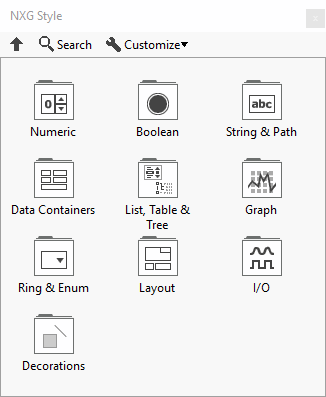
The NXG Style controls came out in LabVIEW 2018 to allow creation of LabVIEW user interfaces that look like LabVIEW NXG user interfaces.
Subpalettes

|
Numeric |

|
Boolean |

|
String & Path |

|
Data Containers |

|
List, Table & Tree |

|
Graph |

|
Ring & Enum |

|
Layout |

|
I/O |

|
Decorations |
History
| Version | Change(s) |
|---|---|

|
The Array, Matrix & Cluster subpalette was renamed the Data Containers subpalette and the Containers subpalette was renamed the Layout subpalette. |

|
LabVIEW 2018 is the first version with the NXG Style palette. |