
Functions Palette/Programming/Numeric/Fixed-Point: Difference between revisions
Started page |
No edit summary |
||
| (One intermediate revision by the same user not shown) | |||
| Line 1: | Line 1: | ||
{{LabVIEW Palette Object Information|palette=Functions Palette/Programming/Numeric{{!}}Numeric palette|type=palette|icon=Functions - Numeric Palette - Fixed-Point.png}} | |||
Use the '''Fixed-Point''' functions to manipulate the overflow status of a fixed-point number. | |||
{{TOCright}} | |||
{{LabVIEW Palette | {{LabVIEW Palette | ||
|image = Fixed-Point Palette.png | |image = Fixed-Point Palette.png | ||
|title = Fixed-Point palette | |title = Fixed-Point palette | ||
|parent = Functions Palette/Programming/Numeric | |||
|1 = Fixed-Point to Integer Cast function{{!}}Fixed-Point to Integer Cast | |1 = Fixed-Point to Integer Cast function{{!}}Fixed-Point to Integer Cast | ||
|2 = Integer to Fixed-Point Cast function{{!}}Integer to Fixed-Point Cast | |2 = Integer to Fixed-Point Cast function{{!}}Integer to Fixed-Point Cast | ||
| Line 8: | Line 14: | ||
|13 = Include Fixed-Point Overflow Status function{{!}}Include Fixed-Point Overflow Status | |13 = Include Fixed-Point Overflow Status function{{!}}Include Fixed-Point Overflow Status | ||
}} | }} | ||
== Functions == | == Functions == | ||
Latest revision as of 21:00, 6 July 2020
| Object information | |
|---|---|
| Owning palette(s) | Numeric palette |
| Type | Palette |
| Requires | Basic Development Environment |
| Icon |  |
Use the Fixed-Point functions to manipulate the overflow status of a fixed-point number.
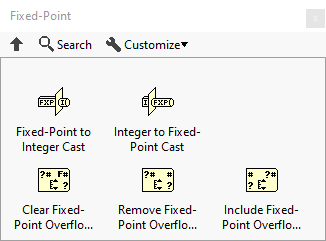
Functions
| Icon | Name |
|---|---|

|
Fixed-Point to Integer Cast |

|
Integer to Fixed-Point Cast |

|
Clear Fixed-Point Overflow Status |

|
Remove Fixed-Point Overflow Status |

|
Include Fixed-Point Overflow Status |
History
 |
History information is needed. What changes have occurred over previous versions? |
| Version | Change(s) |
|---|---|

|
More info to come. |