
Functions Palette/Programming/Synchronization/Notifier Operations: Difference between revisions
Started page |
(No difference)
|
Revision as of 19:45, 22 June 2020
| Object information | |
|---|---|
| Owning palette(s) | Synchronization palette |
| Type | Palette |
| Requires | Basic Development Environment |
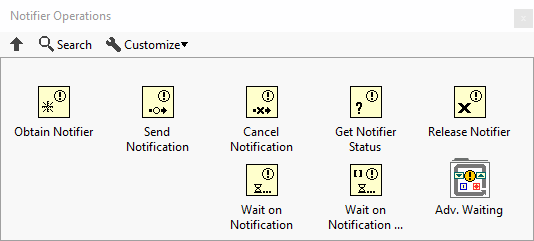
Use the Notifier Operations functions to suspend the execution of a block diagram until you receive data from another section of the block diagram or from another VI running in the same application instance.
You cannot use notifiers to communicate with VIs on other computers. For example, you cannot use notifiers to communicate across a network or the VI Server.
Unlike theQueue Operations functions, the Notifier Operations functions do not buffer sent messages. If no nodes are waiting on a message when it is sent, the data is lost if another message is sent. Notifiers behave like single-element, bounded, lossy queues.
When using a Notifier Operation function in a While Loop, the stop condition should be connected to the execution of the function.
Subpalette
| Icon | Name |
|---|---|

|
Advanced Notifier Waiting |
Functions
| Icon | Name |
|---|---|

|
Obtain Notifier |

|
Send Notification |

|
Cancel Notification |

|
Get Notifier Status |

|
Release Notifier |

|
Wait on Notification |

|
Wait on Notification from Multiple |
History
 |
History information is needed. What changes have occurred over previous versions? |
| Version | Change(s) |
|---|---|

|
More info to come. |