
Functions Palette/Programming/Collection/Set: Difference between revisions
mNo edit summary |
Added parent navigation |
||
| Line 2: | Line 2: | ||
|image = Set Palette.png | |image = Set Palette.png | ||
|title = Set palette | |title = Set palette | ||
|parent = Functions Palette/Programming/Collection{{!}}Collection palette | |||
|1 = Build Set function{{!}}Build Set | |1 = Build Set function{{!}}Build Set | ||
|2 = Insert Into Set function{{!}}Insert Into Set | |2 = Insert Into Set function{{!}}Insert Into Set | ||
Revision as of 19:40, 24 June 2020
| Object information | |
|---|---|
| Owning palette(s) | Collection palette |
| Type | Palette |
| Requires | Basic Development Environment |
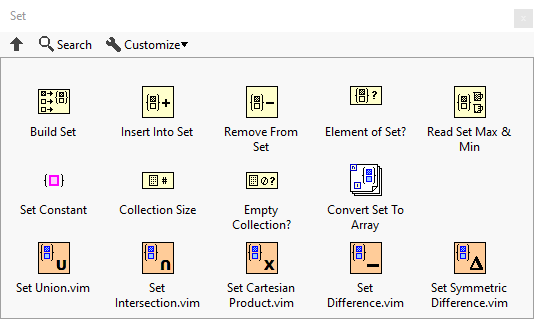
Use the Set VIs and functions to create and manipulate sets.
Functions


History
| Version | Change(s) |
|---|---|

|
Palette added in LabVIEW 2019 |