
Functions Palette/Programming/Collection/Map/Registration Map: Difference between revisions
Started page |
m →History |
||
| Line 27: | Line 27: | ||
== History == | == History == | ||
{| class="wikitable" | {| class="wikitable" | ||
! Version | ! Version | ||
! Change(s) | ! Change(s) | ||
|- | |- | ||
|[[File: | | [[File:LV2019.png|frameless|border|64x64px|LabVIEW 2019|link=LabVIEW 2019]] | ||
| | | Palette added in [[LabVIEW 2019]] | ||
|} | |} | ||
[[Category:Registration Map Palette]] | [[Category:Registration Map Palette]] | ||
Revision as of 19:11, 21 June 2020
| Object information | |
|---|---|
| Owning palette(s) | Map palette |
| Type | Palette |
| Requires | Basic Development Environment |
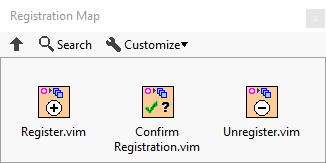
Use the Registration Map VIs to create and manipulate registration maps. A registration map is a map between a key and a set of elements with operations to signal when clients register or unregister for one or more services.
Functions
| Icon | Name |
|---|---|

|
Register |

|
Confirm Registration |

|
Unregister |
History
| Version | Change(s) |
|---|---|

|
Palette added in LabVIEW 2019 |