
Functions Palette/Programming/Numeric/Conversion: Difference between revisions
Added parent navigation |
mNo edit summary |
||
| (One intermediate revision by the same user not shown) | |||
| Line 1: | Line 1: | ||
{{LabVIEW Palette Object Information|palette=Functions Palette/Programming/Numeric{{!}}Numeric palette|type=palette|icon=Functions - Numeric Palette - Conversion.png}} | |||
Use the '''Conversion''' VIs and functions to convert data types. | |||
When these functions convert a floating-point number to an integer, they round the output to the nearest integer, or the nearest even integer if the fractional part is 0.5. If the result is out of range for the integer, these functions return the minimum or maximum value for the integer type. When these functions convert an integer to a smaller integer, they copy the least-significant bits without checking for overflow. When they convert an integer to a larger integer, they extend the sign of a signed integer and pad an unsigned integer with zeros. | |||
Use caution when you convert numbers to smaller representations, particularly when converting integers, because the LabVIEW conversion routines do not check for overflow. | |||
<br> | |||
{{LabVIEW Palette | {{LabVIEW Palette | ||
|image = Conversion Palette.png | |image = Conversion Palette.png | ||
| Line 31: | Line 39: | ||
|64 = Enum to Array of Enums function{{!}}Enum to Array of Enums | |64 = Enum to Array of Enums function{{!}}Enum to Array of Enums | ||
}} | }} | ||
== Functions == | == Functions == | ||
Latest revision as of 20:13, 6 July 2020
| Object information | |
|---|---|
| Owning palette(s) | Numeric palette |
| Type | Palette |
| Requires | Basic Development Environment |
| Icon |  |
Use the Conversion VIs and functions to convert data types.
When these functions convert a floating-point number to an integer, they round the output to the nearest integer, or the nearest even integer if the fractional part is 0.5. If the result is out of range for the integer, these functions return the minimum or maximum value for the integer type. When these functions convert an integer to a smaller integer, they copy the least-significant bits without checking for overflow. When they convert an integer to a larger integer, they extend the sign of a signed integer and pad an unsigned integer with zeros.
Use caution when you convert numbers to smaller representations, particularly when converting integers, because the LabVIEW conversion routines do not check for overflow.
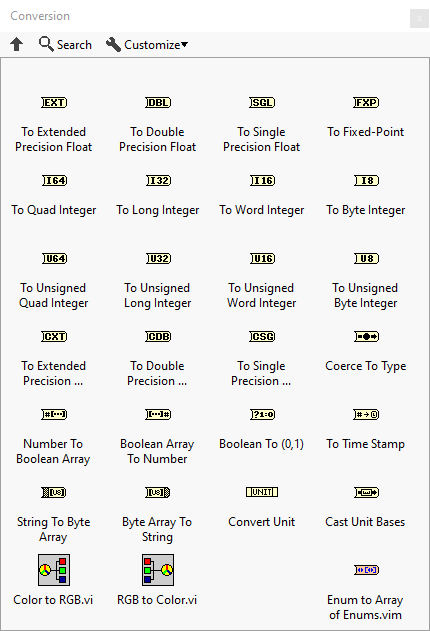
Functions


History
 |
History information is needed. What changes have occurred over previous versions? |
| Version | Change(s) |
|---|---|

|
More info to come. |