
Functions Palette/Programming/Collection/Map: Difference between revisions
Added parent navigation |
mNo edit summary |
||
| (One intermediate revision by the same user not shown) | |||
| Line 1: | Line 1: | ||
{{LabVIEW Palette Object Information|palette=Functions Palette/Programming/Collection{{!}}Collection palette|type=palette|icon=Functions Palette - Programming Palette - Collection.png}} | |||
Use the '''Map''' VIs and functions to create and manipulate [[Map data type|maps]]. | |||
{{TOCright}} | |||
{{LabVIEW Palette | {{LabVIEW Palette | ||
|image = Map Palette.png | |image = Map Palette.png | ||
| Line 15: | Line 19: | ||
|21 = Functions Palette/Programming/Collection/Map/Registration Map{{!}}Registration Map | |21 = Functions Palette/Programming/Collection/Map/Registration Map{{!}}Registration Map | ||
}} | }} | ||
== Subpalette == | == Subpalette == | ||
| Line 48: | Line 48: | ||
! style="text-align: center;" | [[File:Map Palette - Read Map Max & Min Keys.png|frameless|border|Read Map Max & Min Keys|link=Read Map Max & Min Keys function]] | ! style="text-align: center;" | [[File:Map Palette - Read Map Max & Min Keys.png|frameless|border|Read Map Max & Min Keys|link=Read Map Max & Min Keys function]] | ||
| [[Read Map Max & Min Keys function|Read Map Max & Min Keys]] | | [[Read Map Max & Min Keys function|Read Map Max & Min Keys]] | ||
|- | |- | ||
! style="text-align: center;" | [[File:Map Palette - Collection Size.png|frameless|border|Collection Size|link=Collection Size function]] | ! style="text-align: center;" | [[File:Map Palette - Collection Size.png|frameless|border|Collection Size|link=Collection Size function]] | ||
| Line 63: | Line 60: | ||
! style="text-align: center;" | [[File:Map Palette - In Place Element Structure - Map Border Nodes.png|frameless|border|In Place Element Structure - Map Border Nodes|link=In Place Element Structure - Map Border Nodes function]] | ! style="text-align: center;" | [[File:Map Palette - In Place Element Structure - Map Border Nodes.png|frameless|border|In Place Element Structure - Map Border Nodes|link=In Place Element Structure - Map Border Nodes function]] | ||
| [[In Place Element Structure - Map Border Nodes function|In Place Element Structure - Map Border Nodes]] | | [[In Place Element Structure - Map Border Nodes function|In Place Element Structure - Map Border Nodes]] | ||
|} | |||
== Constants == | |||
{| class="wikitable sortable" | |||
! Icon | |||
! Name | |||
|- | |||
! style="text-align: center;" | [[File:Map Palette - Map Constant.png|frameless|border|Map Constant|link=Map Constant]] | |||
| [[Map Constant|Map Constant]] | |||
|} | |} | ||
Latest revision as of 02:40, 25 November 2020
| Object information | |
|---|---|
| Owning palette(s) | Collection palette |
| Type | Palette |
| Requires | Basic Development Environment |
| Icon |  |
Use the Map VIs and functions to create and manipulate maps.
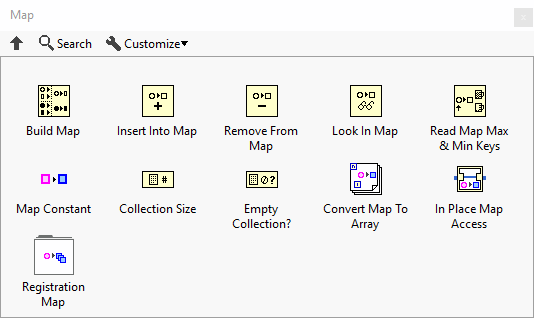
Subpalette
| Icon | Name |
|---|---|

|
Registration Map |
Functions
| Icon | Name |
|---|---|

|
Build Map |

|
Insert Into Map |

|
Remove From Map |

|
Look In Map |

|
Read Map Max & Min Keys |

|
Collection Size |

|
Empty Collection? |

|
Convert Map To Array |

|
In Place Element Structure - Map Border Nodes |
Constants
| Icon | Name |
|---|---|

|
Map Constant |
History
| Version | Change(s) |
|---|---|

|
Palette added in LabVIEW 2019 |