
Controls Palette/Classic: Difference between revisions
Started page |
mNo edit summary |
||
| Line 15: | Line 15: | ||
{{LabVIEW Palette Object Information | {{LabVIEW Palette Object Information | ||
|palette = | |palette = Controls Palette | ||
|type = palette | |type = palette | ||
}} | }} | ||
Revision as of 19:08, 11 May 2020
| Object information | |
|---|---|
| Owning palette(s) | Controls Palette |
| Type | Palette |
| Requires | Basic Development Environment |
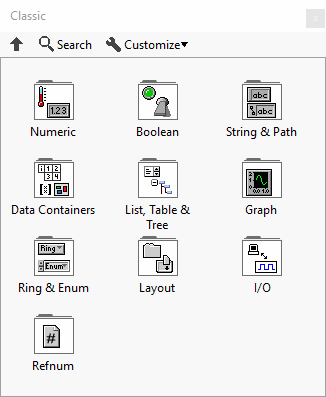
The Classic controls are the original set of controls.
Subpalettes

|
Numeric |

|
Boolean |

|
String & Path |

|
Data Containers |

|
List, Table & Tree |

|
Graph |

|
Ring & Enum |

|
Layout |

|
I/O |

|
Refnum |
History
| Version | Change(s) |
|---|---|

|
The Array, Matrix & Cluster subpalette was renamed the Data Containers subpalette and the Containers subpalette was renamed the Layout subpalette. |