Revision as of 14:13, 23 April 2020
| VI Server Method Information
|
| Method ID
|
95B
|
| Scope
|
Basic Development Environment
|
| Data Name
|
ClearCompObjCache
|
| Short Name*
|
ClearCompObjCache
|
| Long Name*
|
Clear Compiled Object Cache
|
| * Displayed here in English. Short and Long names appear in the language of the LabVIEW IDE.
|
| Owning Class ID
|
1
|
| Owning Class Name
|
Application Class
|
| Return Data Type
|
No return value
|
| Invoke Node
|
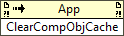
|
| Available in Real-Time Operating System | No |
| Available in Run-Time Engine | No |
| Remote access allowed | Yes |
Deletes all compiled code in the User object cache.
The User object cache contains the compiled code for the following kinds of files:
This method is similar to selecting User from the Cache list in the Clear Compiled Object Cache dialog box and clicking the Delete button.
| Note This method does not clear the Application Builder object cache. Use the Clear Application Builder Cache method to clear the Application Builder object cache programmatically.
|
Parameters
This method has no parameters.
Uses
History
| Version
|
Change(s)
|

|
More info to come.
|
See Also
External Links


