
VI Analyzer (Palette): Difference between revisions
m Simplify parent palette name |
Utilize Template:Node list |
||
| Line 22: | Line 22: | ||
==Subpalettes== | ==Subpalettes== | ||
{| | {{node list|entries= | ||
{{node list/entry|VI Analyzer Utilities Palette Icon.png|VI Analyzer Utilities palette|VI Analyzer Utilities}} | |||
}} | |||
==Functions== | ==Functions== | ||
{ | {{node list | ||
|VIAn Easy Analyze | |||
|VIAn Easy Report | |||
| | |VIAn New Task | ||
|VIAn Run | |||
| | |VIAn Save Configuration File | ||
|VIAn Destroy Task | |||
}} | |||
| | |||
| | |||
| | |||
[[Category:Palettes]] | [[Category:Palettes]] | ||
[[Category:LabVIEW VI Analyzer Toolkit]] | [[Category:LabVIEW VI Analyzer Toolkit]] | ||
Revision as of 07:17, 12 August 2024
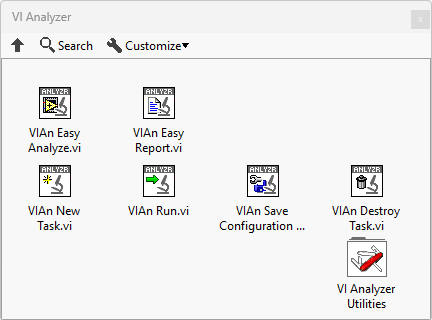
The VI Analyzer palette is added by the LabVIEW VI Analyzer Toolkit add-on and provides programmatical control over the configuration and execution of tests using VI Analyzer.
| Object information | |
|---|---|
| Owning palette(s) | Programming |
| Type | Palette |
| Requires | LabVIEW VI Analyzer Toolkit |
| Icon |  |
Subpalettes
| Icon | Name |
|---|---|
 | VI Analyzer Utilities |
Functions
| Icon | Name |
|---|---|
 | VIAn Easy Analyze |
 | VIAn Easy Report |
 | VIAn New Task |
 | VIAn Run |
 | VIAn Save Configuration File |
 | VIAn Destroy Task |