Revision as of 14:26, 21 April 2020
| VI Server Method Information
|
| Method ID
|
7F7
|
| Scope
|
Basic Development Environment
|
| Data Name
|
Conn Responsive.Check
|
| Short Name*
|
Conn Responsive.Check
|
| Long Name*
|
Connection Responsiveness:Check
|
| * Displayed here in English. Short and Long names appear in the language of the LabVIEW IDE.
|
| Owning Class ID
|
1
|
| Owning Class Name
|
Application Class
|
| Return Data Type
|
data type
[[File:|frameless|border||link= data type]]
|
| Invoke Node
|
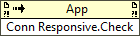
|
| Available in Real-Time Operating System | Yes |
| Available in Run-Time Engine | Yes (Read/Write) |
| Remote access allowed | Yes |
Checks if the VI Server connection is responsive.
Use this method to check the status of a VI Server connection. If the connection is not responsive, the method returns network connection error code 1130. The method prompts the server for a message and considers the connection unresponsive if LabVIEW does not receive a message within the time you specify in PingDelay. Use the Connection Responsiveness:Information method to set PingDelay.
Parameters
This method has no parameters.
Uses
History
| Version
|
Change(s)
|

|
More info to come.
|
See Also
External Links


