Revision as of 19:45, 29 March 2020
| VI Server Property Information
|
| Property ID
|
42
|
| Scope
|
Basic Development Environment
|
| Data Name
|
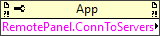
RemotePanel.ConnToServers
|
| Short Name*
|
RemotePanel.ConnToServers
|
| Long Name*
|
Remote Panel:Connections To Servers
|
| * Displayed here in English. Short and Long names appear in the language of the LabVIEW IDE.
|
| Owning Class ID
|
1
|
| Owning Class Name
|
Application Class
|
| Data Type
|
Common Cluster Array TypeDef data type

|
| Property Node
|
|
| Available in Real-Time Operating System | Yes |
| Available in Run-Time Engine | Yes (Read Only) |
| Permissions | Read Only |
| Remote access allowed | No |
Returns an array of clusters containing connection information about the servers to which the computer is currently connected.
Elements
| Name
|
Description
|
| VI Name
|
Name of the VI on the server to which you want to connect. To specify a VI that is part of a LabVIEW project, you must include the project name, the project library, and the target in the path of the VI, when applicable. For example, if MyVI.vi resides in a project called MyProject.lvproj under target My Computer, enter the VI name as MyProject.lvproj/My Computer/MyVI.vi. If the VI resides in a project library called MyLibrary, also include the project library in the path, as in MyProject.lvproj/My Computer/MyLibrary.lvlib:MyVI.vi. If the VI is not in a project or project library, you can enter the VI name without any additional information.
|
| Remote
|
IP address of the server to which you are connected.
|
| UserName
|
Your current LabVIEW user name.
|
| Port
|
Port number currently being used by the server computer.
|
| Status
|
An enumeration type that specifies the controlling status of the connection.
|
| Create Time
|
A time stamp that specifies in seconds when the connection was created.
|
| Status Time
|
A time stamp that specifies in seconds when the server changed to its current connection status.
|
| Control End Time
|
A time stamp that indicates when the server will regain control of the VI or transfer control to another client. A value of MM/DD/YY indicates that the server administrator did not set a time limit for the VI in the Web Server page of the Options dialog box.
|
Use the Remote Panel:Open Connection To Server method to open a connection to a server.
Uses
History
| Version
|
Change(s)
|

|
More info to come.
|
See Also
External Links


