|
|
| Line 52: |
Line 52: |
| {{ambox|text=Add links to external resources that would also help.}} | | {{ambox|text=Add links to external resources that would also help.}} |
|
| |
|
| [[Category: Property]] [[Category:VI Server Property]]
| | [[Category:VI Server Property]] |
Latest revision as of 13:45, 7 May 2020
| VI Server Property Information
|
| Property ID
|
C55E80D
|
| Scope
|
Basic Development Environment
|
| Data Name
|
AutoProjection
|
| Short Name*
|
AutoProjection
|
| Long Name*
|
Automatic Projection Mode
|
| * Displayed here in English. Short and Long names appear in the language of the LabVIEW IDE.
|
| Owning Class ID
|
84
|
| Owning Class Name
|
SceneWindow Class
|
| Data Type
|
Enum U16 data type

|
| Property Node
|
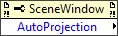
|
| Available in Real-Time Operating System | Yes |
| Available in Run-Time Engine | Yes |
| Loads the block diagram into memory | No |
| Loads the front panel into memory | No |
| Need to authenticate before use | No |
| Permissions | Read/Write |
| Remote access allowed | Yes |
| Settable when the VI is running | Yes |
Reads or writes whether LabVIEW automatically updates the projection mode when you resize the scene window.
Values
| 0
|
None—(Default) LabVIEW does not automatically update the projection mode when you resize the scene window.
|
| 1
|
Perspective—LabVIEW automatically updates the projection to simulate a real-world perspective. Objects that are farther away from the viewer appearing smaller than closer objects.
|
| 2
|
Orthographic—LabVIEW automatically updates the projection to map objects directly into the scene without affecting the relative size of the objects.
|
Uses
History
| Version
|
Change(s)
|

|
More info to come.
|
See Also
External Links


